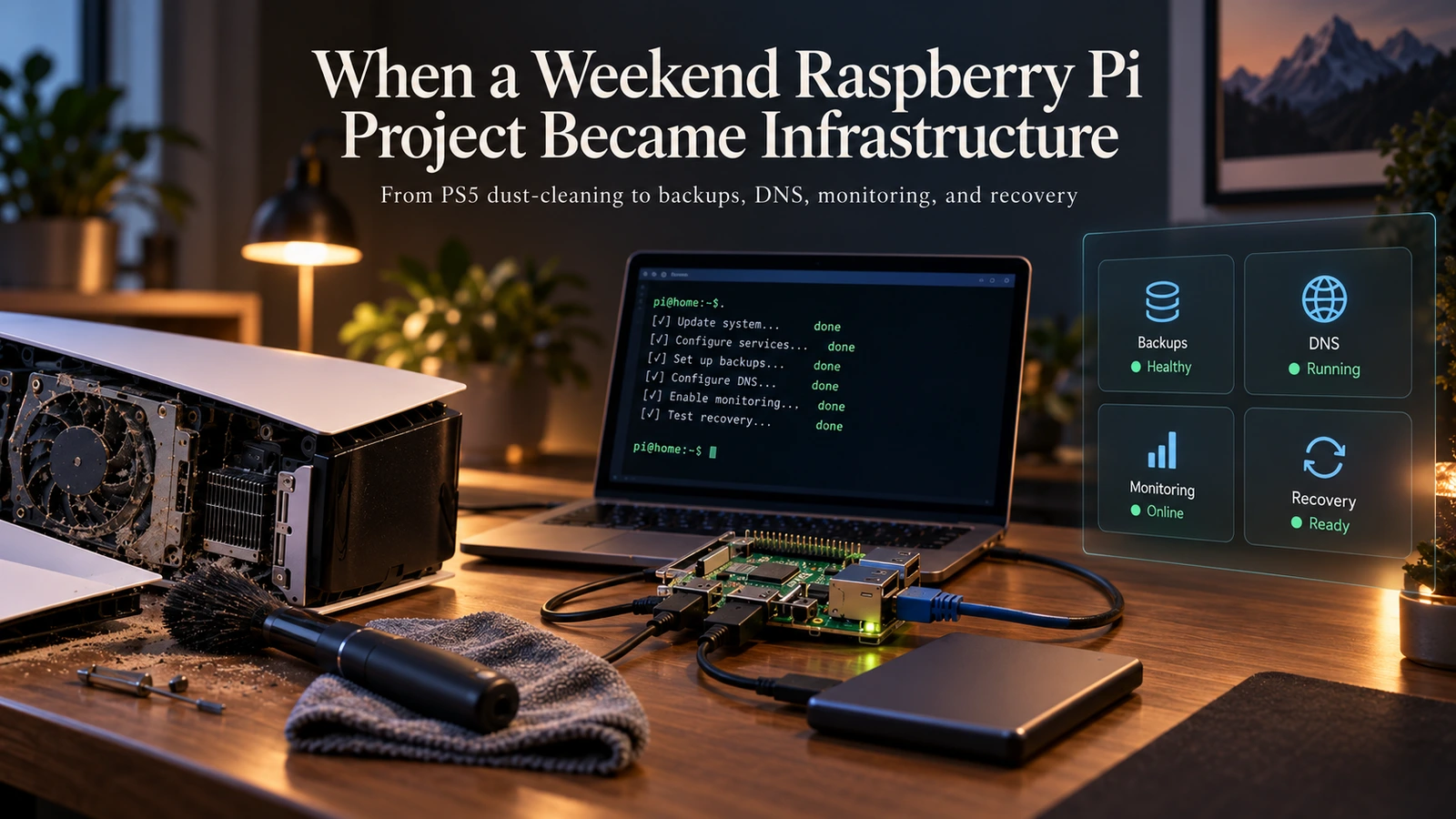
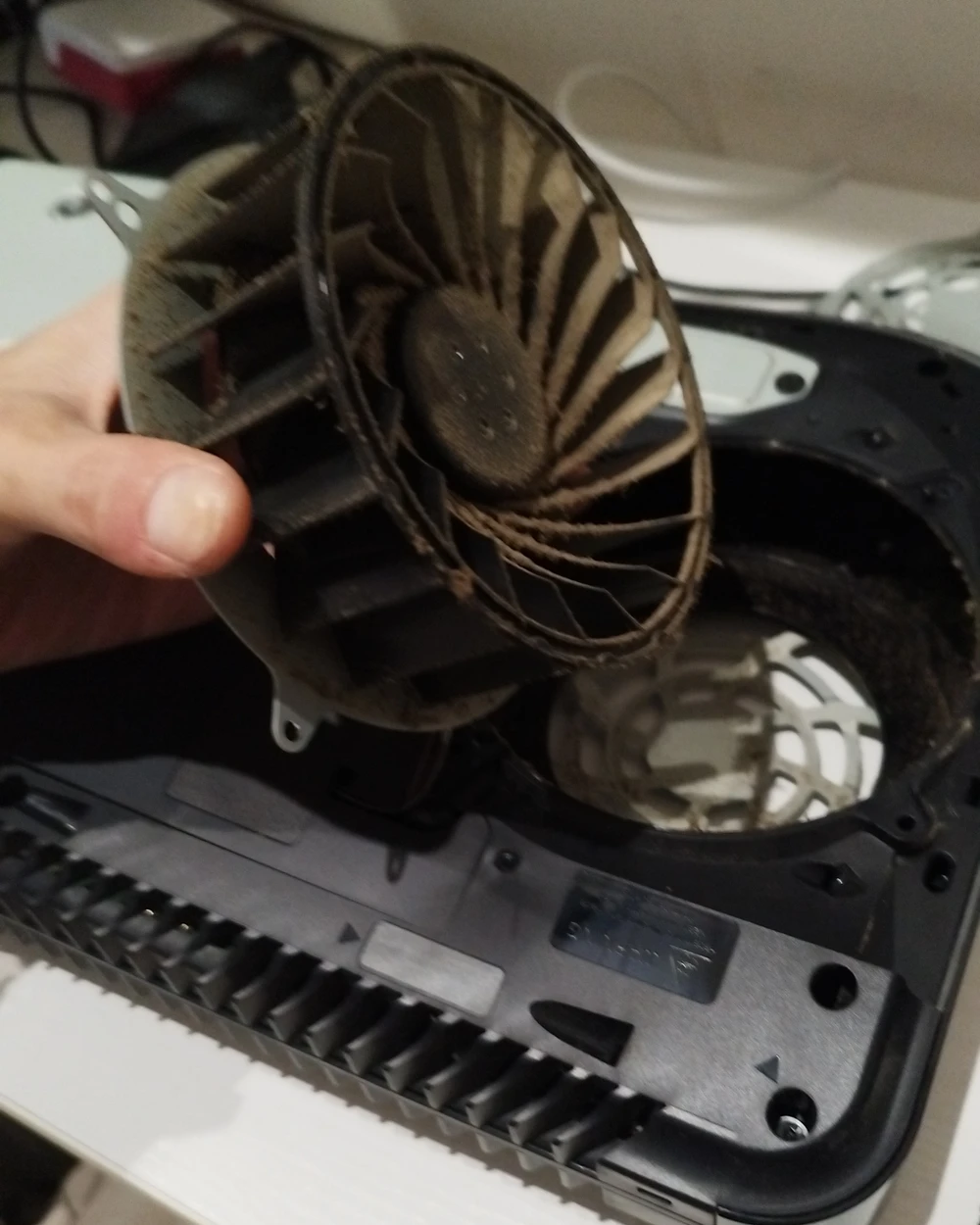
Last weekend started with me cleaning dust out of my PS5.
Nothing dramatic. Side panels off, fan out, vacuum cleaner nearby. One of those jobs you put off for months because the console still works, until one Saturday you look at it and decide today is apparently the day.
A few hours later I was configuring DNS on a Raspberry Pi.
By Sunday evening I had a password vault, offsite backups, a disaster-recovery procedure and a brand new open-source project. None of it was planned.
A Pi with nothing to do
The Pi was already sitting there. I bought it earlier this year for Nephtys, because I wanted real edge hardware for the benchmarks instead of trusting my laptop’s opinion of what counts as “edge”. The benchmarks were done. What was left was a Pi 5, a Samsung T7 and the feeling that the machine should do something with the other 99% of its life.
I did not want another toy deployment. I wanted a machine I would actually notice being offline.
To be clear about the scale: this is not a homelab. It is one Pi with 4 GB of RAM, swap on zram (so “just add swap” spends RAM to save RAM), and one SSD that is also the boot disk. No NAS, no cluster, no spare node. Honestly, that made things simpler.
Everything went into a private repository. I will call it the house repo, because you cannot open it anyway: it describes my actual machine, with its hostname, its storage layout, my network, and all the little compromises a real computer collects.
Then I started adding the things I could see myself using.
Syncthing, so the phone pushes photos to the Pi without me thinking about it. Samba, because a
file server should behave like a file server and not need scp every time. Tailscale, which made
remote access boring, and that is the nicest thing you can say about remote access. Then AdGuard
Home. Then Vaultwarden. Then Uptime Kuma.
As a list, none of this is interesting. Things got interesting once I started trusting it.
The vault ruined the mood
You can be relaxed about a hobby container. Dashboard dies, you restart it. A password vault is different: the moment Vaultwarden was on the machine, I had to ask what my backup actually meant.
At that point the backup was restic, pushing the filesystem to Backblaze B2 every night. Perfectly normal. It was also copying a live SQLite database in WAL mode, in the middle of whatever transaction happened to be running. That kind of thing works right up until the first time it matters.
So SQLite now takes its own snapshot, with the right locks held. The snapshot gets checked with
integrity_check, and only then does restic get to see it. If the vault snapshot fails, the whole
backup fails.
That last part took me two tries. The first version kept the previous good snapshot on disk when a new one failed, which sounds safe until you notice what it means: today’s backup quietly carries yesterday’s vault and still says “success”. I prefer loud.
The kernel had other plans
Memory went the same way. With 4 GB to share, I gave every container a memory limit, and the Compose file looked great.
Except Raspberry Pi OS boots with the memory cgroup disabled, so Docker had quietly thrown all of
them away. One warning line, and docker inspect reporting Memory=0 while the Compose file
insisted otherwise. The config said the containers were bounded. The kernel disagreed, and the
kernel wins these arguments.
I like this one because it is the whole weekend in miniature. We check that we asked a system to
do something, and then treat that as proof that it did. So the house repo filled up with checks
against what is actually true: not “does Compose say mem_limit” but “what does memory.max
say”; not “is the DNS container up” but “does a blocked domain come back blocked”.
Syncthing made the same point in miniature. It accepted a folder path that made perfect sense to me and quietly wrote everything into an anonymous Docker volume, where neither Samba nor the backup could see it.
Verify behaviour, not declarations. That became the rule for the rest of the weekend.
Sunday: pretending the Pi is dead
By Sunday the Pi was useful, which created a new problem. What happens when the SSD dies?
If this thing holds my files, my DNS and my passwords, “I can probably remember how I set it up” is not a plan. So I spent Sunday pretending the machine was already dead.
That produced more code than all the services put together: a bootstrap script that takes a blank Pi to a working host, a restore script, systemd timers, and images pinned by digest, because learning mid-recovery that a fresh Vaultwarden image has decided to migrate your vault is a special kind of bad day.
Testing the restore was, of course, where I broke something. I pointed a trial restore at /tmp,
which on Raspberry Pi OS is a 2 GB tmpfs. In other words, RAM. Free memory went from 3.3 GiB to
under 1 GiB before I killed it, on the machine serving DNS to all my devices. The restore script
now refuses tmpfs targets and checks free space before starting.
Monitoring had its own version of this. Uptime Kuma sent its alerts to ntfy at the same tailnet
HTTPS address my phone uses, which is perfectly reasonable until you remember the alert travels
from one container to another, and containers cannot resolve tailnet names. When I stopped
Vaultwarden to test it, my phone stayed quiet for three minutes. The right URL was just
http://ntfy.
In the end, recovery came down to three things that must not die with the machine: the repository, the encrypted offsite backup, and the credentials to open it.
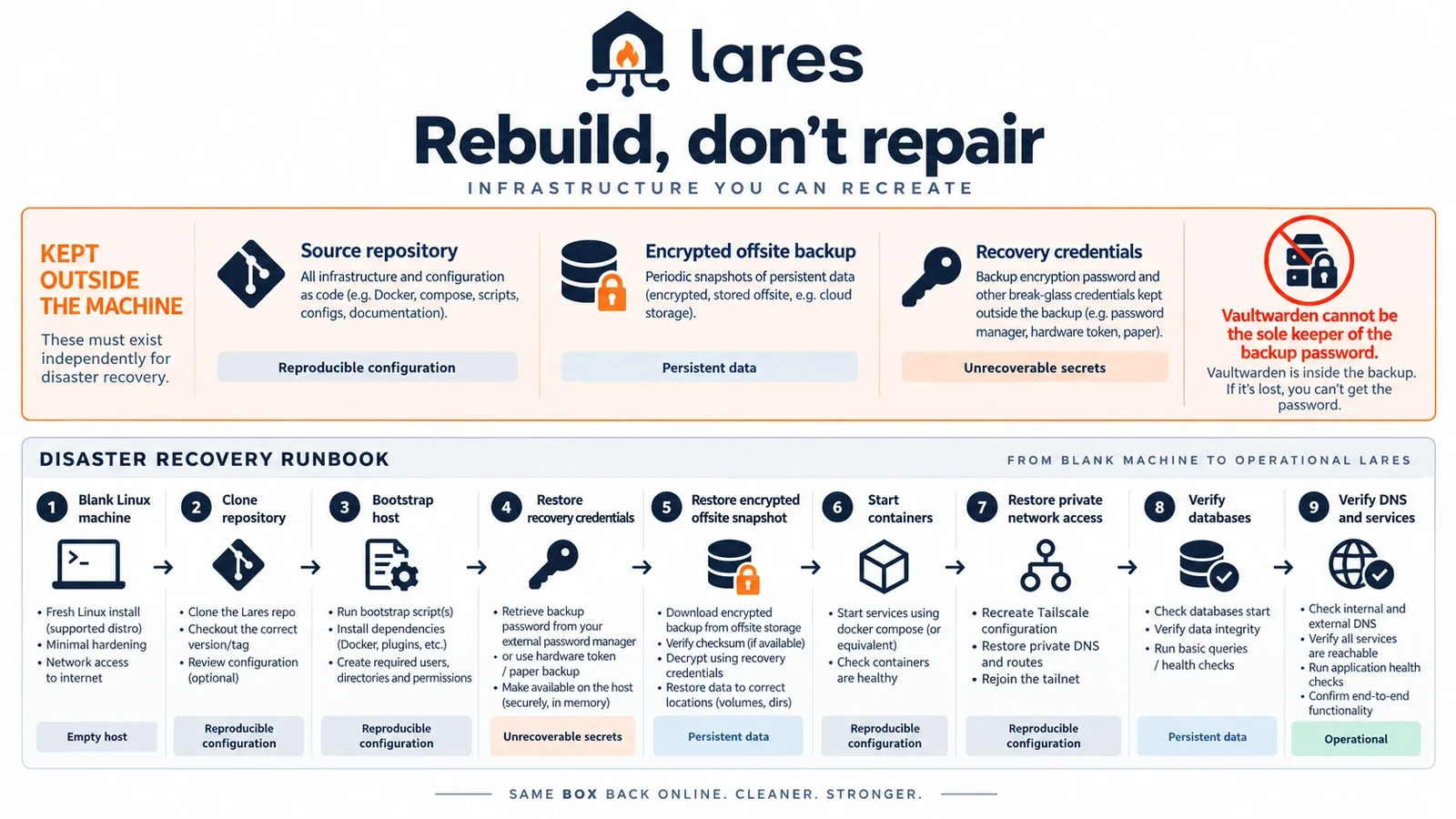
The third one hides a lovely trap. Vaultwarden cannot be the only place holding the password for the backup that contains Vaultwarden. You would need the password to restore the vault that holds the password. It took me longer than I would like to admit to notice. The house repo’s README, written on Saturday, says in bold that the restic password belongs in Vaultwarden.
Some secrets need to live somewhere very boring. Paper is still annoyingly good at this.
Sunday evening: an accidental open-source project
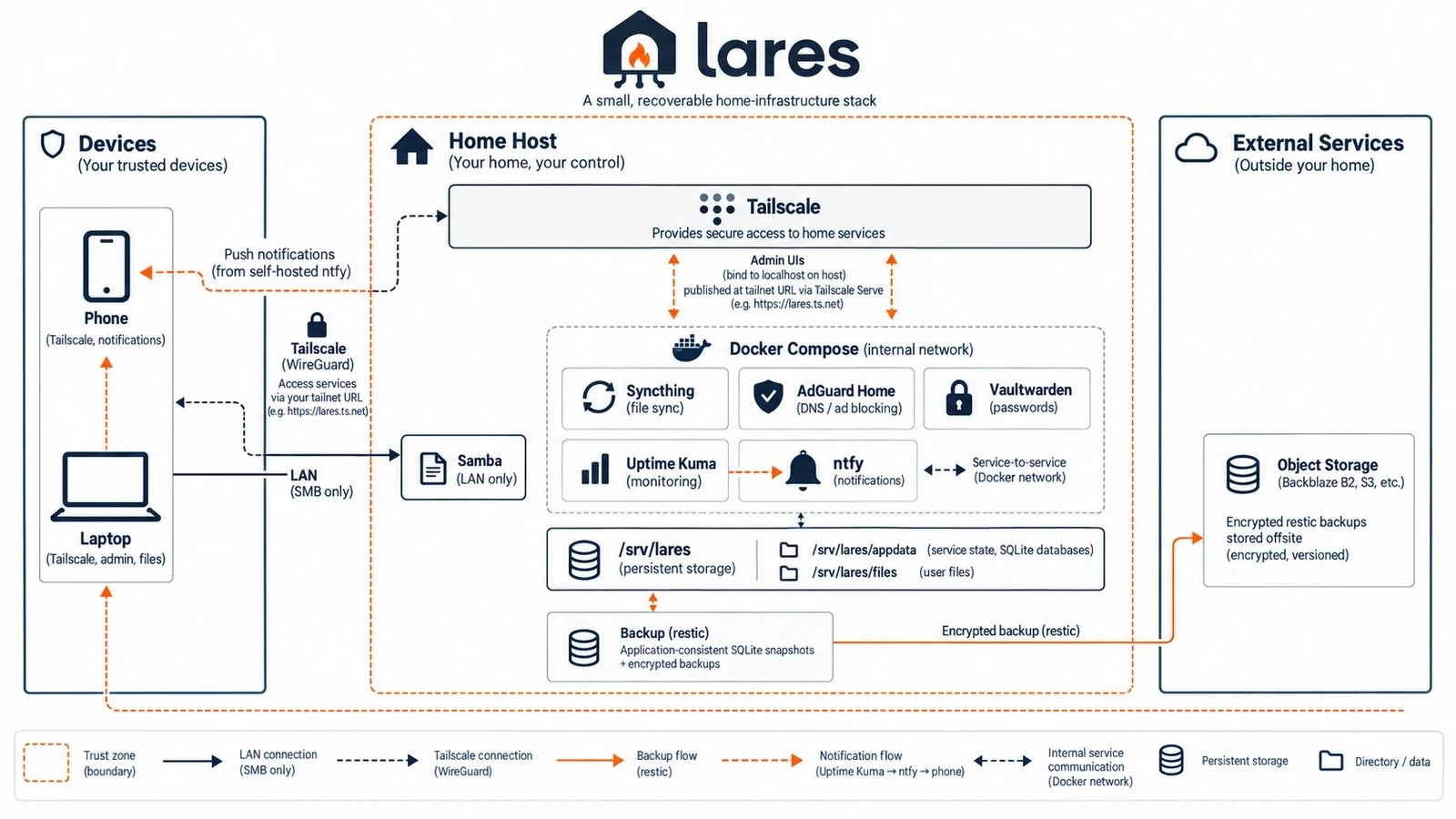
Sunday afternoon I looked at the house repo and realised some of it might be useful outside my house. Not the service list: there are thousands of Compose files with AdGuard and Vaultwarden in them. The useful bits were the SQLite snapshots, the kernel-checked memory limits, the tmpfs guard, admin UIs that never touch the LAN, and a recovery path I had actually walked.
The house repo itself knows too much about my Pi to go public, which is exactly its job. So I pulled out the parts that were not specific to my house, and that became Lares. The name comes from the Roman household gods, the guardians of the home. A bit grand for a repo that is mostly SQLite snapshots and Samba config, but I liked it.
The first version looked surprisingly clean. Then I read it as if a stranger were going to clone it, and it started confessing.
The backup script used a variable that only existed on my machine, so every scheduled backup would
have died before writing a byte. The Samba config contained ${PI_USER}, which Samba does not
expand. My Pi’s real hostname had survived the cleanup in compose.yaml. And a CI check meant to
catch unset variables ran the scripts with an empty environment, watched them exit on the missing
config file, and went green: a passing test for code it never reached. I have
written about this exact species of bug
before, and apparently I needed the reminder.
And my favourite: the check I wrote to stop my tailnet’s ID from leaking worked by searching for my tailnet’s ID. The leak detector was the last leak left. It now looks for the shape of a leak instead of a list of my private values.
Making it generic forced every assumption to answer one question: is this part of the design, or is it just true in my house?
Monday: it bit back
While cleaning up Lares on Sunday evening, I found a bug in the backup script. Before each run it checked whether the restic repository existed, and if the check failed it assumed there was no repository yet and created one.
The trouble is that “the repository does not exist” and “I cannot reach the repository right now” look exactly the same from that check. Guess wrong and you get a fresh empty repository that backs up happily forever, while the real one sits unreachable and the monitor stays green. So Lares stopped guessing. It fails, and says what it refuses to decide.
I fixed it in Lares. I did not fix it in the house repo that night.
On Monday it fired for real. A restore drill I had cancelled with pkill left three locks in the
B2 repository, the lock made the check fail, and the nightly run announced that the repository was
not initialised and tried to create a new one. Right on top of the existing backup.
Restic refused, because the repository was very obviously already there. That refusal is the only reason this story is funny.
It gets better. I ran verify.sh, the script I had written the night before for exactly this kind
of thing, against the broken Pi. All twenty-four checks passed. The timer was enabled, a recent
snapshot existed, and meanwhile the backup job itself sat in failed. My own verifier was checking
what was scheduled, not what had actually run. Verify behaviour, not declarations. Yes, I know.
Both repos now clear stale locks first, never create a repository on their own, and check the result of the last run. If two failures look identical from where you are standing, automation does not get to pick the convenient one.
Monday also answered what happens if the Pi itself gets compromised. The docs claimed a
bucket-scoped B2 key could not delete its own backups; B2 said the key had deleteFiles. The Pi now
has an append-only key: it can add backups, not erase them. Another declaration, another check.
Where it landed
Today the two repos split the work neatly. The house repo is what my machine actually looks like. Lares is what I learned running it that is still worth keeping once my machine leaves the story. Fixes flow both ways, and some things stay private on purpose. My Pi only accepts SSH keys now, for example, but making that a Lares default would lock out anyone who followed the setup guide with a password.
Lares runs AdGuard Home, Syncthing, Vaultwarden, Uptime Kuma, ntfy, Samba, Tailscale and restic in about 900 MiB of RAM. I could swap half of those tomorrow and it would still be the same project, because the project is really the questions. What if the database is mid-write during the backup? What if an image changes upstream? What if the backup quietly stops running? What if I have to rebuild all of this in six months, having forgotten half of it?
There is plenty left, parked as open issues rather than good intentions: Tailscale routes that still live in prose, verification output a machine can read, and a restore canary that runs on its own, because a backup nobody has restored is still mostly a promise.
What I am trying hard not to do is turn it into a homelab distribution. There is always another service to install, and that road has no end. What I want is smaller: a few services that matter, on hardware I understand, with failure modes I have actually triggered, and a way back when the machine eventually dies.
It took a weekend, plus a Monday of it biting back. As I write this the Pi has been up for about 120 hours, and I use it every day without thinking about it, which was the whole point.
The PS5 vents are clean too.